Entities and categories
Entities say where an idea happens, and categories say what kind of improvement it is. Both show up when submitting, in filters and in the indicators.
How do I build the entities?
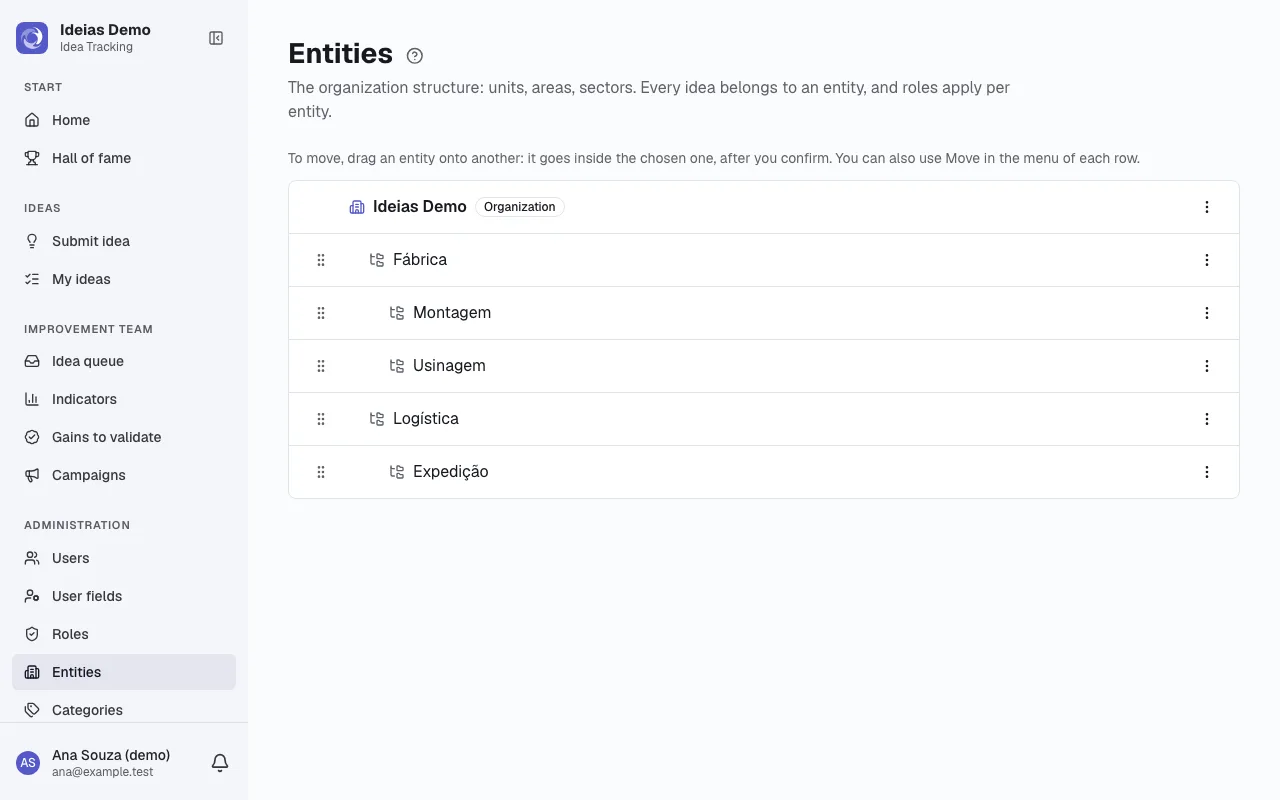
Entities form a tree: the organization, its sites and its departments. Every idea belongs to an entity, and roles apply per entity (with or without the sub-entities). So build the tree the way your organization really works, following who answers to whom.
How do I move an entity?
Drag the entity by its handle, at the left of the row, and drop it on the new parent entity. With the keyboard, Space picks it up, the arrow keys choose the destination and Space drops it. If you'd rather not drag, use Move in the row's menu.
Since moving changes who sees what, ITS asks for confirmation before saving, and the sub-entities move along. The root doesn't move, and an entity can't go inside itself or one of its descendants: those destinations are disabled while you drag.
How do I set up the categories?
For each category, you set the name, the color and whether it's active. To start quickly, import a ready-made set: Safety + QDCEP (Quality, Delivery, Cost, Environment and People) or Generic. An idea has one main category and can have others.
How do I change the order of the categories?
The order is the same one used in lists and forms. Drag the row by its handle, use the Move up and Move down buttons or move it with the keyboard. The new order applies to the whole list at once and is recorded in the audit log.
Why deactivate instead of delete?
Use Deactivate: an inactive entity or category takes no new ideas, but the old ones stay visible and filterable. It's the right way to retire a department that closed without losing its history.
How do idea codes work?
Each idea gets a sequential code per year, like ITS-2026-0042, which ITS generates and which never changes. You can change the prefix ("ITS") in Settings. If your organization has its own tracking, use the optional external reference field to link the two.