Submit an idea
Spotted something that could be better? Any employee can submit an idea, and it takes less than a minute.
What do I need to fill in?
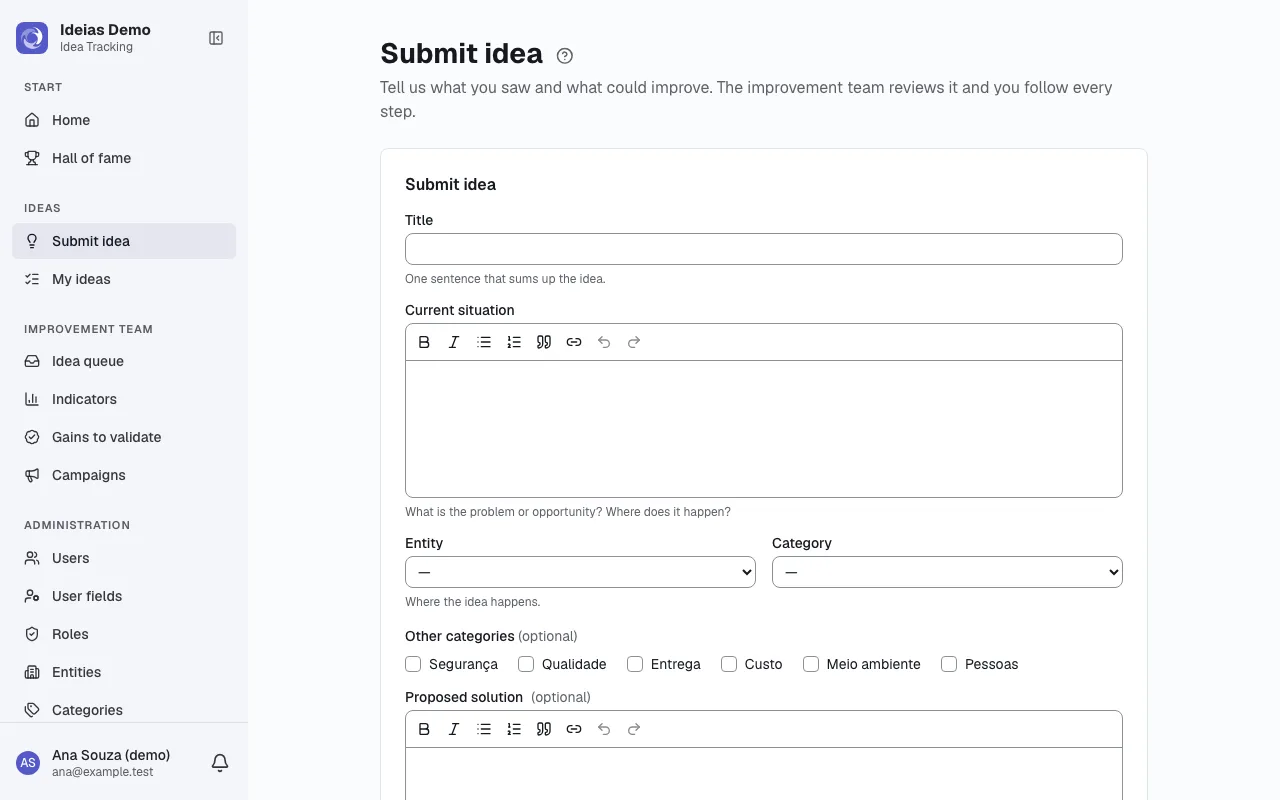
In the menu, choose Submit idea. Three fields are required:
- Title: one sentence that sums up the idea. "A label that does not peel off in the cold" says more than "Suggestion".
- Current situation: the problem (or the opportunity) and where it happens. You don't need a solution; a problem that's well explained already helps a lot.
- Entity: the site or department where this happens.
The Category (Safety, Quality, Cost…) may or may not be required; your organization decides. If there's an open campaign, it's highlighted on the form: you can link the idea to the campaign, but you don't have to. A proposed solution, expected gain and attachments are optional, but welcome. A photo pasted into the text isn't kept: send it as an attachment.
Can I send a photo or a document?
Yes. Each idea takes up to 10 files: photos, videos or documents, in the types and size the administrator set. To check a file before you submit, click its name.
If a file doesn't upload, the idea goes through anyway: ITS shows the reason, and you can attach the file again on the idea page. Forgot a photo or sent the wrong one? While the idea is Submitted or In review, you can still add and remove your files. Once it's approved, the improvement team takes care of the files: if one is missing, ask for it in a comment.
What if someone already had the same idea?
As you type, ITS shows open ideas similar to yours. If one of them asks for the same thing, click Support this idea: you become a co-author, and the team doesn't have to review the same request twice. If none of them matches, submit yours. See Support an idea.
Practice: submit an idea and watch similar ones show up
Simulation with made-up data: nothing here changes ITS.
What happens after I submit?
- The idea gets a number, like
ITS-2026-0043, and starts as Submitted. - Right away, you see the Expected reply: the date by which the team should answer for the first time.
- When an analyst takes on the review, you're notified. The rest is in Follow your idea.