Integrations: setting up
Systems such as Power Automate, n8n, BI dashboards and ERPs often need to read data from ITS. That's what the integration API is for: it's separate from the API the screens use and has a stable contract. It reads and, if you want, writes in four small actions, and you decide what it does.
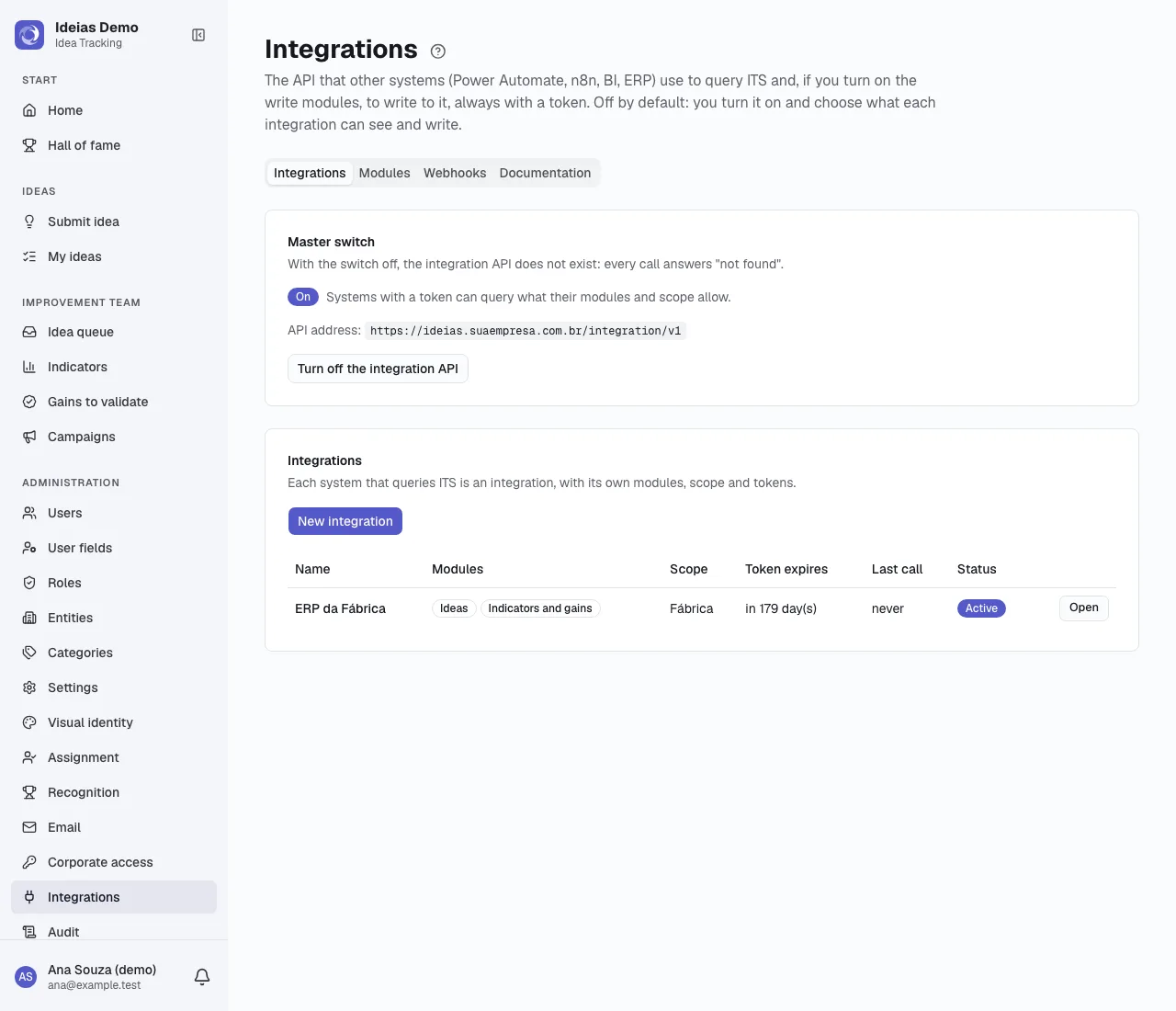
The screen is in Administration > Integrations and only shows for people with the Manage integrations (API and webhooks) permission (out of the box, the Administrator).
Who decides what each integration sees?
There are three layers, and the smallest result among them always applies:
- The master switch turns the whole API on or off.
- The modules are parts of the API (ideas, indicators and gains, campaigns, the Hall of fame, entities and categories, users, the store), and you turn them on one by one.
- Each system that queries ITS is an integration, with the modules it can use and the entity scope it sees.
How do I open the API?
1. Turn on the master switch
The Master switch block shows what's missing. To turn it on, the System address (in Settings > Notifications and email) must start with https:// (or be localhost), so the token never travels in the open. Then click Turn on the integration API.
2. Turn on the modules
In the Modules tab, tick what your organization wants to offer and click Save modules. The Users and Store (orders) modules are flagged as sensitive, because they return people.
| Module | What it offers |
|---|---|
| Ideas | Ideas from the entities in the scope, with their steps. Never comments, attachments or history |
| Indicators and gains | The same numbers as the reports and the list of validated gains (never declared or estimated ones) |
| Campaigns | Active and closed campaigns, with the ideas in the scope. Drafts and rewards don't leave |
| Hall and recognition | Highlights and praise, without the author of the praise. Points, levels and rankings of people don't leave |
| Entities and categories | The entity tree of the scope and the categories |
| Submit ideas and comment (writes) | Submits ideas on behalf of a person, by their email and only if they can submit in that entity. It also comments on behalf of the integration and updates the external reference |
| Record declared gains (writes) | Records the declared gain of an idea. Validating the gain is always up to a person |
| Users | Name, status and roles of the people in the scope. The email only goes out if you tick the option on the integration |
| Store (orders) | Orders from the whole store, without the entity scope, so the HR system can follow them. The balance and statement never leave. See Manage the store and bonuses |
Turning a module off cuts every integration from it at once, and you don't need to recreate anything.
3. Create the integration
Click New integration and fill in:
- Name and Owner, the person who answers for it.
- Modules: only the ones turned on appear.
- Entity scope: the entities it sees, with or without sub-entities. With no entity, it sees nothing. For the whole organization, explicitly tick the root entity with its sub-entities.
- Calls per minute (default 60, up to 600) and, if you want, the Allowed IPs.
- Include people's e-mail: off out of the box. Tick it only if the system really needs it; the choice is recorded in the audit log.
- Token validity (days): from 1 to 365.
4. Hand over the token
When you create the integration, ITS shows the token, which starts with its_, only once. Copy it and hand it to the person in charge of the system through a safe channel. After you close the window, only the start of the token stays visible, and there's no way to recover the value.
Whoever will use the token needs Integration API: how to consume it and, if the integration will write, Writing through the API.
How do I replace the token?
Open the integration and use Generate new token. The old token keeps working for a window (default 24 hours, up to 72), so you can switch it in the system without dropping the integration. Each integration has at most 2 active tokens. When you're done switching, use Revoke token on the old one.
How do I suspend or revoke an integration?
Suspend pauses the integration, and nothing gets through until you use Reactivate. Revoke integration is final: the tokens die and the integration doesn't come back. If the system still needs access, create another one.
How do I see usage?
In each integration, the Usage (last 7 days) table shows the calls per module: total, 4xx and 5xx errors and how many hit the limit. ITS doesn't keep the address called, the parameters or who was looked up, and reads don't go into the audit log.
What about when the token is about to expire?
The token must have an expiry date, and system health gets the Integration token item: attention 30 days before expiry and failure at 7 days (or once expired). The failure raises the alert for people with the observability permission. Generate a new token before then. See Reading observability.
What goes into the audit log?
Everything you do goes into Audit: turning the switch on or off, changing modules, creating, changing, suspending and revoking integrations, and creating, rotating and revoking tokens. The token value never goes into the audit log.
What does the Documentation tab show?
In Integrations > Documentation you'll find, only for the modules turned on, the routes, the parameters, the fields of each response, an example and a ready-made curl call. With View as, you see what a specific integration sees, and Download OpenAPI (JSON) downloads the contract. The examples are made up: no real data or token appears there, and the tab makes no calls to the API.
What if the other system needs to know right away?
Instead of the other system checking from time to time, ITS can notify it as soon as something happens, at an address you allow. That's what webhooks do: see Webhooks: setting up.
What does the API never return?
Whatever the configuration, the API never returns comments (public or internal), history, attachments, step owners, gains not yet validated, passwords, sessions, photos, corporate sign-in identifiers or the name of anyone who asked not to appear. People who turned on Hide my name in boards and rankings, and people who were anonymized, follow the same rules as in the Hall of fame.